Using the Synapse Media Fileset Dialog Box
The Synapse Media Fileset dialog box displays when you launch an executable created by the DICOM Transfer to Media process.
Synapse creates a password-protected .zip archive as a self-extracting .zip file when you select Password protect ZIP Archive under Create ZIP Archive when exporting DICOM images using the DICOM Transfer - to Media tool.
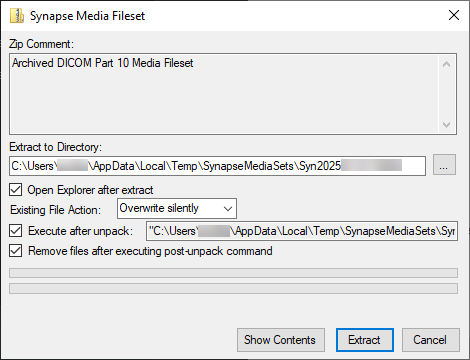
Steps
- Launch the executable. The Synapse Media Fileset dialog box displays.
- Select from the options below.
|
Field |
Description |
|---|---|
|
Zip Comment |
Identifies the .zip archive contents. |
|
Extract to Directory |
Specifies the location on the file system where the tool extracts the archive. |
|
Open Explorer after extract |
If selected, when the extraction completes, Windows Explorer opens the folder in which the archive was extracted. |
|
Existing File Action |
Specifies the action the tool takes when extracting the archive.
|
|
Execute after unpack |
When selected and additional content is present in the archive, such as an image viewer, the location of the executable that the tool should run after extraction displays. You cannot modify this path because the path is calculated from the folder in which the tool extracted the archive (the Extract to Directory field). |
|
Remove files after executing post-unpack command |
If selected, the tool deletes the files from the location where the tool extracted the archive after the executable runs and completes the archive extraction. |
|
Show Contents |
Displays the list of files in the archive. |
|
Extract |
Starts the archive extraction process using the provided settings.
|
|
Cancel/Quit |
The Cancel button changes to Quit after you attempt an extraction.
|
Results
The tool successfully extracts the contents of the .zip archive to the designated location.
Opening Password-Encrypted Media
A clinic might send you a disc containing a password encrypted (AE 256) ZIP archive file. These archives are created as executable (EXE) application files that launch when you load the disc.
- Loading a disc with a self-extracting archive (EXE) launches the self-extracting Synapse Media Fileset dialog box. Use the settings in the Synapse Media Fileset dialog box (described above) to extract the contents of the archive to the preferred location.
- In the case of an archive spanning more than one disc, a self-extracting archive (EXE) exists on each disc containing the appropriate portion of the larger media fileset.
- There will be a README.TXT on each disc that contains a self-extracting archive that reads:
The <self-extracting archive name> file is a self-extracting, encrypted DICOM Part 10 Media Fileset generated by FUJIFILM Healthcare Americas Corporation.
If the disc does not auto-launch, double-click the <self-extracting archive name>.
Depending on the size of the media fileset and the speed of the optical drive, it may take several minutes for the application to display.
- In this file, <self-extracting archive name> represents the name of the self-extracting archive executable.