Vessel Diagrams Overview
Clinical Reporting Application (CRA) uses vessel diagrams to document angiographic procedure findings in a diagrammatic format for arterial and venous diagrams. The vessel diagram is an interactive application where you can edit imported or new data.
Synapse supports the following vessel diagrams:
- Coronary
- Peripheral Arterial
- Peripheral Venous
- Non-Invasive Arterial
- Non-Invasive Venous
- Non-Invasive Dialysis
Arterial Diagrams
Arterial diagrams support the following:
Venous Diagrams
Venous diagrams support the following:
Vein Types and Colors
|
|
|
|
|
|
|
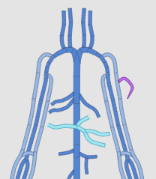
- The new vein will be the same type and color as the originating vein.
- You cannot add a vein between a portal vein and a deep or superficial vein.
- When you attach a detached vein or artery, Synapse does not change the type or color of the vein or the artery.
Navigating Cardiovascular Diagrams Video
This video describes vessel diagrams and how to manipulate the diagrams.
For more information about this video tutorial, see Video Tutorials.